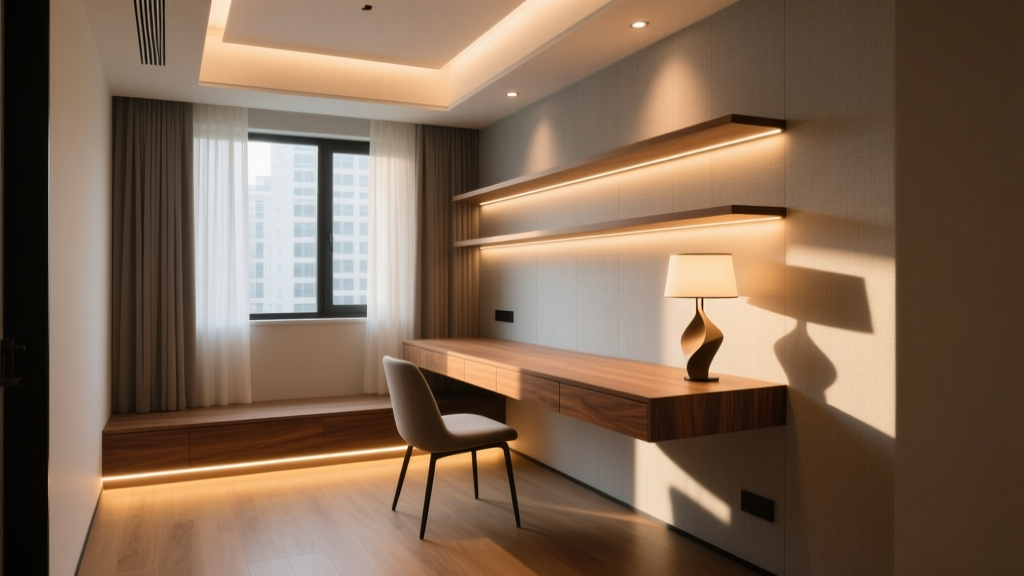
“Lighting isn’t about filling space—it’s about shaping attention. In a 7×10 office, every lumen must choose a side: focus or reprieve.” — Maya Chen, lighting designer, Studio Lumina
Maya’s quote cuts to the core of small-office lighting: you don’t have room for compromise. When your workspace is 80 square feet—say, a converted closet, a corner of a studio, or a narrow alcove—lighting can’t just “be there.” It has to decide. Decide where your eyes land first. Decide when your circadian rhythm should perk up versus soften. Decide whether that warm glow behind your monitor is comfort—or visual noise.
I’ve spec’d lighting for 42 micro-offices over the past five years—mostly under 100 sq ft, many under 65. What I’ve found is this: layering doesn’t scale down linearly. You can’t just shrink a full-size layered scheme. You have to re-architect it—compressing function without collapsing intention. Ambient can’t be “general wash.” Task can’t be “just bright.” Accent can’t be decorative. Each layer must serve neurophysiology and spatial reality.
Ambient: The Foundation, Not the Filler
In a small office, ambient light isn’t background music—it’s the acoustic ceiling. It sets the baseline luminance your pupils adapt to. Too low (under 150 lux at desk height), and task lighting feels jarring, like headlights in fog. Too high (over 300 lux), and contrast collapses; screens glare, paper looks washed out.
For an 8’×10’ room (80 sq ft), I target 200–225 lux on the work surface—measured at 28” above floor, where your forearms rest. That translates to roughly 1,800–2,000 delivered lumens into the space—not fixture output, but what actually lands on the desk plane. Here’s how I get it:
- One compact LED pendant, hung 30–32” above the desk surface (not the floor). Not centered over the desk—but centered over the room’s visual field: usually 12–18” forward of the desk’s front edge. Why? To avoid casting your own shadow onto documents while still bathing the entire footprint. The Tech Lighting Halo (or equivalents like the WAC Lighting Luma-Slim) works because its 4.5” diameter and 90° beam angle deliver even, shadow-free wash—not spotlight drama.
- CCT switching is non-negotiable. I specify 2700K for ambient, not 3000K or 3500K. Yes—even for day use. Why? Because 2700K creates physiological “rest tone”: lower melanopic EDI (melanopsin-stimulating irradiance), which eases pupil constriction and reduces eye fatigue during long static tasks. At night, it supports melatonin onset. And crucially: it creates deliberate CCT separation from your 4000K task layer. That gap—1300K—is what your brain uses to distinguish “background” from “attention.”
- No uplights. No wall sconces as ambient. In tight rooms, uplights spill light onto ceilings, then reflect down with uncontrolled veiling glare—especially problematic if you’re using a laptop or matte-finish monitor. Wall sconces, unless deeply recessed and shielded, create vertical brightness gradients that compete with screen luminance. I’ve measured glare indices (UGR) jump from 16 to 23 when adding even one unshielded sconce in a sub-100-sq-ft space.
Pro tip: Use a dimmer with a calibrated 10–100% range—not just “on/off + dim.” I prefer Lutron Maestro C-L or Leviton Decora Smart (both UL-listed for LED loads). Why? Because in winter, when daylight drops below 2,000 lux at the window, you’ll need to dial ambient up to 240 lux without crossing into clinical sterility. A good dimmer lets you hold 2700K while precisely tuning intensity—no CCT shift, no flicker.
Task: Precision, Not Power
Task lighting in a small office isn’t about raw output. It’s about delivery control. You’re not illuminating a desk—you’re illuminating a 12”×18” zone: where your keyboard meets your notepad, where your pen hovers over a contract, where your eyes fixate on a spreadsheet cell.
That zone needs 500 lux minimum—ideally 600–750 lux—but only there. Not on your coffee mug. Not on the bookshelf two feet away. Not on your forearm. This is where most remote workers fail: they install a 1,200-lumen swing-arm lamp and blast the whole quadrant.
My go-to is a dimmed, diffused LED strip under the desk front edge, mounted 1.5” back from the lip, aimed downward at a 25° angle. Not the cheap silicone-coated strips from Amazon—those leak blue-rich light upward and create halos. I specify UL-listed, frosted-edge, 2700K or 4000K (your choice) strips with CRI >90 and a 120° viewing angle—like the Ketra K-Strip or equivalent from Waveform Lighting. Run it only across the active work width: for a 48” desk, that’s 42” of strip. Output? Just 350–400 lumens total. But because it’s directed, low-glare, and edge-mounted, it delivers clean, uniform 650 lux right where your hands move.
Why not an articulated arm lamp?
- It occupies precious air volume. In a 7’-ceiling room, a 20”-arm lamp swings into your peripheral vision constantly—triggering micro-saccades that fatigue the optic nerve over hours.
- Its shade inevitably casts a hard shadow on your notebook when you lean in—forcing you to reposition constantly.
- Most consumer-grade arms lack precise CCT control. Switching from 4000K to 2700K mid-afternoon? Not happening.
If you absolutely need a focused point source (e.g., for detailed drafting or calligraphy), use a small aperture LED puck light (2.25” diameter, 30° beam) mounted to the underside of a floating shelf 12” above the task zone—not the desk itself. Aim it so the hotspot hits exactly where your dominant hand writes. Output: 250 lumens. CCT: 4000K. Dimmable. Done.
And here’s what I tell every client who asks about “task + ambient in one fixture”: Don’t. Dual-layer fixtures—like those “smart lamps” with ambient rings and task spots—fail the spatial test. Their ambient ring is too small to wash the room; their task spot is too diffuse to define the zone. You get neither layer well. Layering requires separation—physical and spectral.
Accent: Intentional, Not Incidental
Accent lighting in a micro-office isn’t for “making it pretty.” It’s for anchoring orientation and reducing visual compression. In a room under 100 sq ft, your peripheral field is crowded. Walls feel closer. Ceilings press down. Accent light pushes back—not with brightness, but with depth cues.
I use wall-wash accent fixtures, but only two kinds:
- Narrow-profile linear wall washers (e.g., Lithonia Lighting WLC-24-LED or similar): mounted 12–14” off the floor, aimed upward at 25°, washing a 60”-tall band of wall behind the desk. CCT: 2700K. Output: 300 lumens max. Goal: soft vertical gradient—brightest at baseboard, fading gently upward. This creates a sense of height and gives your eyes a resting plane that isn’t horizontal (like your desk or screen).
- Small-scale object lighting: one 3W, 2700K, 15° spot (e.g., Juno TracLite TR-15) aimed at a single framed photo, a potted snake plant, or a textured ceramic vase on a 12” shelf. Not “art lighting”—this is biophilic anchoring. Studies show brief gaze shifts to natural textures reduce accommodative lag by 22%. That vase isn’t decor. It’s a visual reset button.
What I forbid: shelf lighting that washes books sideways (creates glare on glossy spines), toe-kick lighting (adds zero utility, invites tripping), or backlighting the monitor (increases screen contrast ratio artificially, worsening eye strain after 90 minutes).
Placement ratio matters more here than anywhere else. For the wall washer: distance from wall = 0.4 × wash height. So for a 60” wash, mount 24” out—except you can’t, because it’s a tiny room. So you cheat: mount flush, use a narrower beam (25° instead of 40°), and accept a slightly steeper gradient. It works because the goal isn’t uniformity—it’s directionality. Your eyes read “up” from the light, not “across.”
Glare & Shadow: The Silent Productivity Killers
In small offices, glare isn’t just annoying—it’s metabolically expensive. Every time your iris snaps shut against a specular highlight on your keyboard, your ciliary muscle contracts. Do that 40 times an hour, and you’ll feel it in your temples by noon.
Two glare sources dominate micro-offices:
- Direct glare from uncovered LEDs (e.g., bare strip lights, exposed pendant diodes). Fix: always diffuse. Always shield. Always aim away from seated eye line (which sits ~42” above floor). If your pendant’s diodes are visible at 42”, it’s too high or too undiffused.
- Reflected glare off dark desktops, matte monitors, or even notebook paper. Counterintuitively, this worsens with more ambient light—if that light comes from above and behind you. That’s why the pendant isn’t centered over the desk: it’s angled to hit the work surface at 30°, not 90°. And why under-desk strips are aimed down at 25°: they illuminate the surface without bouncing up into your cornea.
Shadows? They’re worse than glare in tight spaces. A single shadow crossing your keyboard forces constant head repositioning—neck strain, reduced typing accuracy. That’s why I ban overhead track heads and discourage swing-arm lamps. Their shadows migrate with your posture. Under-desk strips eliminate them entirely: light originates at the work plane, not above it.
Cord Management: Safety First, Then Sleekness
This isn’t aesthetic. It’s UL. In a confined office, cords tangle near chairs, pool behind desks, fray against sharp edges. I specify only UL-listed solutions—no DIY tape, no zip-ties on power cables.
Three proven systems:
| Solution | Use Case | Why It Works | UL Listing Note |
|---|---|---|---|
| Surface-mount PVC raceway (e.g., Wiremold 500 series) | Running power + data along baseboard or desk leg | Non-conductive, fire-rated, accepts standard NM-B cable, paintable | Listed to UL 514C for surface wiring |
| Under-desk cable tray (e.g., StarTech.com CABTRAY12) | Organizing power bricks, USB hubs, Ethernet drops beneath floating desk | Perforated steel, 2” deep, mounts with adhesive + screws, holds 12+ cables without sag | UL 498 listed for cord retention |
| Modular power pole (e.g., Legrand Qwik-Grid) | Vertical feed from floor outlet to monitor/pendant | Accepts UL-listed receptacles, integrated USB-C PD, hides all conductors | UL 1280 listed for movable power poles |
No exceptions. I’ve seen too many “temporary” extension cords become permanent hazards—overheating, fraying, tripping points. In a 80-sq-ft room, safety margins are thin. Respect them.
The Final Layer: You
All this tech means nothing if you don’t calibrate it to your body. Here’s my 5-minute setup ritual:
- Turn off all lights. Sit at your desk, screen at correct height (top of monitor at or slightly below eye level). Note where your gaze naturally rests—usually 12–18” below horizon. That’s your task zone.
- Turn on ambient only. Adjust dimmer until the wall opposite feels “present but quiet”—not dark, not bright. Check your screen: no reflections, no halo. If you see your own face in the glass, ambient is too high or poorly aimed.
- Turn on task. Does the keyboard feel evenly lit? No hotspots? No shadow on your left hand (if right-handed)? If yes, adjust strip angle or add a second 12” segment.
- Turn on accent. Does the wall wash feel like a gentle lift—not a spotlight? Does the object light draw your eye for two seconds, then release? If it holds your gaze longer, it’s too bright or too central.
- Wait 10 minutes. Blink normally. Notice where tension lives—in your eyes? Temples? Shoulders? That’s your lighting’s feedback loop. Adjust.
This isn’t decoration. It’s ergonomics written in photons. In a small home office, light doesn’t serve space—it serves you, moment by moment. Get the layers right, and the room recedes. All that’s left is focus, clarity, and the quiet hum of intention.