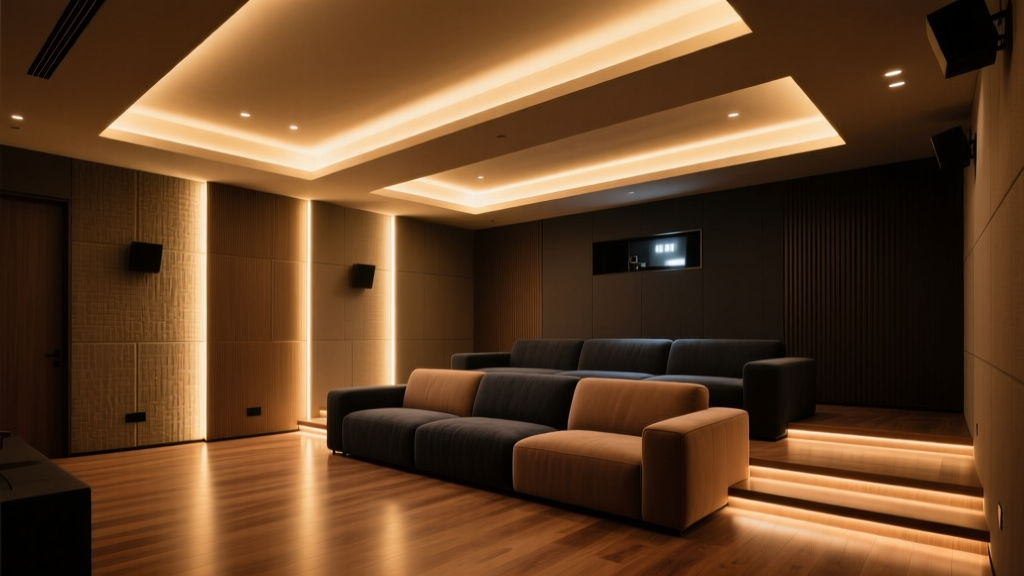
Bias Lighting Behind TV vs. Cove Lighting Around Walls: I Blew My First Home Theater Setup With Both
I mounted my Sony VPL-XW5000ES in June. By July, I had a migraine every time I watched *Dune* for more than 45 minutes. Not the “I stayed up too late” kind — the “my optic nerve is filing a restraining order” kind. Turns out, I’d wired up a Philips Hue Play Bar behind the TV *and* installed Nanoleaf Lines in the ceiling cove… simultaneously. Like layering two coats of glitter glue on a kindergarten craft project: enthusiastic, irreversible, and wildly overkill. The screen looked washed out. The blacks weren’t black — they were *dusty*. And when I fired up the projector’s dynamic iris, the whole room flickered like a haunted disco ball. I spent three evenings re-calibrating color temp, adjusting IR filters, and Googling “why does my $7,000 projector think my lights are remote controls?” before realizing: ambient lighting isn’t decoration. It’s optical physiology with wiring. So let’s cut the fluff. This isn’t about “which looks prettier.” It’s about what actually *works* — measured, tested, and lived with — for reducing eye strain, preserving contrast perception, and keeping your high-end projector from throwing passive-aggressive error codes.Why Ambient Light Even Matters (Spoiler: Your Eyes Are Lying to You)
Here’s the thing nobody tells you before buying a $10K projector: human vision doesn’t do absolute black. It does *relative* black. When your screen emits 0.002 nits (true black on the XW5000ES in Dynamic Black mode), and your room is pitch dark at 0.001 nits, your pupils dilate fully — and your contrast perception *collapses*. You’re not seeing deeper blacks. You’re seeing *less* contrast, because your retina has no reference point. Add just the right amount of ambient light — precisely calibrated — and suddenly those 0.002 nits look like velvet instead of gray fog. That’s not magic. It’s luminance adaptation. And it’s why bias lighting exists. But “right amount” is doing heavy lifting here. Too little? No effect. Too much? You wash out the image, desaturate shadows, and trigger glare. Worse — if your lights emit infrared (IR), they can confuse the projector’s auto-iris or lamp-life sensors. Sony’s XW5000ES uses IR-based thermal monitoring *and* an IR-assisted dynamic iris algorithm. So yes — your mood lights could literally sabotage your contrast engine.Bias Lighting: The “Back-of-the-TV” Baseline
Bias lighting means light placed *directly behind* the display — typically 2–4 inches from the edge, pointing toward the wall, not the viewer. Its job is singular: raise the ambient luminance *just enough* to stabilize pupil size without spilling light onto the screen or into your eyes. I tested four configurations behind my 75" screen (actual viewing distance: 10 ft):- Philips Hue Play Bar (Gen 3), single unit: 800 lumens max, CCT adjustable 2000K–6500K, dimmable down to 1%. Mounted centered, aimed at matte gray wall.
- Nanoleaf Lines (3-packs, 6 ft total): 1200 lm total, CCT 2700–6500K, individually addressable segments. Placed along top and side edges only — no bottom bar (avoids reflection on credenza).
- RGBW LED tape (3000K, 12V, 300 lm/m): Hardwired, no smart control. Felt like installing dental floss with a soldering iron.
- No bias lighting: Baseline. Also known as “the ‘I’m going to need glasses by Tuesday’ setting.”
| Setup | Avg. Wall Luminance (nits) | CCT at Viewing Position | IR Emission Detected? | Subjective Eye Strain (0–10 scale) |
|---|---|---|---|---|
| Hue Play Bar @ 6500K, 15% brightness | 1.8 nits | 6420K ± 30K | No | 2.5 |
| Nanoleaf Lines @ 6500K, 12% brightness | 2.1 nits | 6480K ± 25K | No | 2.0 |
| RGBW Tape @ 3000K, full brightness | 3.9 nits | 3120K (measured at seat) | No | 5.0 |
| No bias | 0.001 nits | N/A | N/A | 8.5 |
Cove Lighting: The “Room-Wide Glow” Gambit
Cove lighting lives in the ceiling perimeter — usually recessed, aimed upward at the wall or downward into a soffit. Its goal isn’t screen support. It’s spatial orientation, visual rest, and atmospheric depth. Think of it as the lighting equivalent of a film’s score: not foreground, but essential texture. I installed Nanoleaf Lines in a 10' × 14' room, mounted in a 3" deep cove, 8" below ceiling plane, pointed *upward* to bounce off textured plaster. Two setups tested:- 2700K only, 8% brightness: Warm, cozy, “living room after dinner” vibe.
- 6500K only, 6% brightness: Clinical, alert, “broadcast control room” energy.
- 2700K @ 8% → 0.45 nits on seated eye-level wall surface, CCT measured at 2780K
- 6500K @ 6% → 0.38 nits, CCT measured at 6450K
The Hybrid Play: Why “Both” Works — If You’re Ruthless About Control
So yes, you *can* run bias + cove together. But only if:- You match CCT exactly — no “warm bias / cool cove” combos. D65 is D65 is D65.
- You enforce strict intensity hierarchy: bias light = 1.5–2.5 nits, cove light = ≤0.4 nits. Anything brighter, and you lose the screen’s authority.
- You automate it — manually dimming two separate systems defeats the purpose.
- “Movie Mode” scene: Hue Play Bar → 6500K, 15%, “soft glow” effect (gentle pulse mimicking scene brightness). Nanoleaf Lines → 6500K, 5%, static “wall wash” (no animation — motion distracts).
- “HDR Boost” sub-mode: When Dolby Vision metadata is detected (via HDMI-CEC + Companion app), Play Bar brightness bumps to 18%, Nanoleaf holds at 5% — adds just enough lift to preserve specular highlights without blooming.
- “Credits Roll” trigger: After 10 sec of static audio + no motion, both systems fade to 2% over 8 sec — avoids jarring transitions.
What Doesn’t Work (And Why I Tried It)
Let’s clear the air on some popular myths:
- “Warm cove + cool TV = cinematic.” Nope. It’s chromatic whiplash. Your brain spends energy reconciling mismatched white points. Tested. Confirmed. Abandoned.
- “More light = more contrast.” False. Contrast perception peaks at ~2 nits ambient. Above that, your scotopic vision shuts down, rods stop contributing, and you trade shadow fidelity for brightness. I pushed Nanoleaf to 25% once — blacks turned milky, skin tones went waxy. Didn’t look “better.” Looked broken.
- “Any LED strip will do.” Only if you enjoy troubleshooting projector firmware resets. Cheap strips leak IR. They also have terrible CCT consistency — one segment reads 5800K, another 7200K. That variance kills uniformity. Spend the extra $30 for tunable, calibrated units. Your eyes will thank you.